


2026 update: use authorized playlists, not working-channel guarantees
Added September 30, 2026. The older guide below is retained for context. Its channel counts, direct stream links and availability claims are not current playback guarantees. A GitHub listing is not proof that a stream is licensed for your location or player. Use only streams made available by their rights holders for the access you intend. Do not bypass a paywall, login requirement, DRM or geographic restriction.
You do not need a GitHub account simply to read a public repository or copy a public playlist URL. For the updated import checks, screenshots and troubleshooting steps, see the new practical section at the end of this guide.
Ever found yourself flipping through the same old channels on your TV, hoping to stumble upon something new and exciting? Well, the universe of television has expanded beyond the remote in your hand, and it’s all happening on a platform called IPTV GitHub.
Imagine a place where you can browse through thousands of channels from all around the world without needing a satellite dish or an expensive cable subscription. That’s what IPTV GitHub offers! It’s like a big digital library that holds endless lists of TV channels, and guess what? You can access it all with just a few clicks.
In this guide, we’ll walk through what IPTV GitHub is, how you can use it to watch your favorite channels, and how to ensure it works smoothly for you. So, let’s dive into this digital adventure together and explore the new age of television!
You can read our trending blog Totally Science GitLab: What is It?
What is IPTV GitHub?
IPTV, which stands for Internet Protocol Television, transmits television services through the Internet. Unlike traditional cable or satellite systems, IPTV allows you to stream content directly through your internet connection, paving the way for a plethora of channels worldwide. Now, enter GitHub: a platform known for hosting and sharing code. Combine the two, and you have IPTV GitHub – a haven for those seeking to explore international television channels.
IPTV GitHub is a repository that hosts a vast array of IPTV channels curated by a community of enthusiasts. The brilliance of this combination is that it takes the notion of television beyond boundaries, making global content accessible right at your fingertips.
Also have a look at 10+ Best Unblocked IO Games: Your Gateway to a World of Fun
How to Access IPTV GitHub?
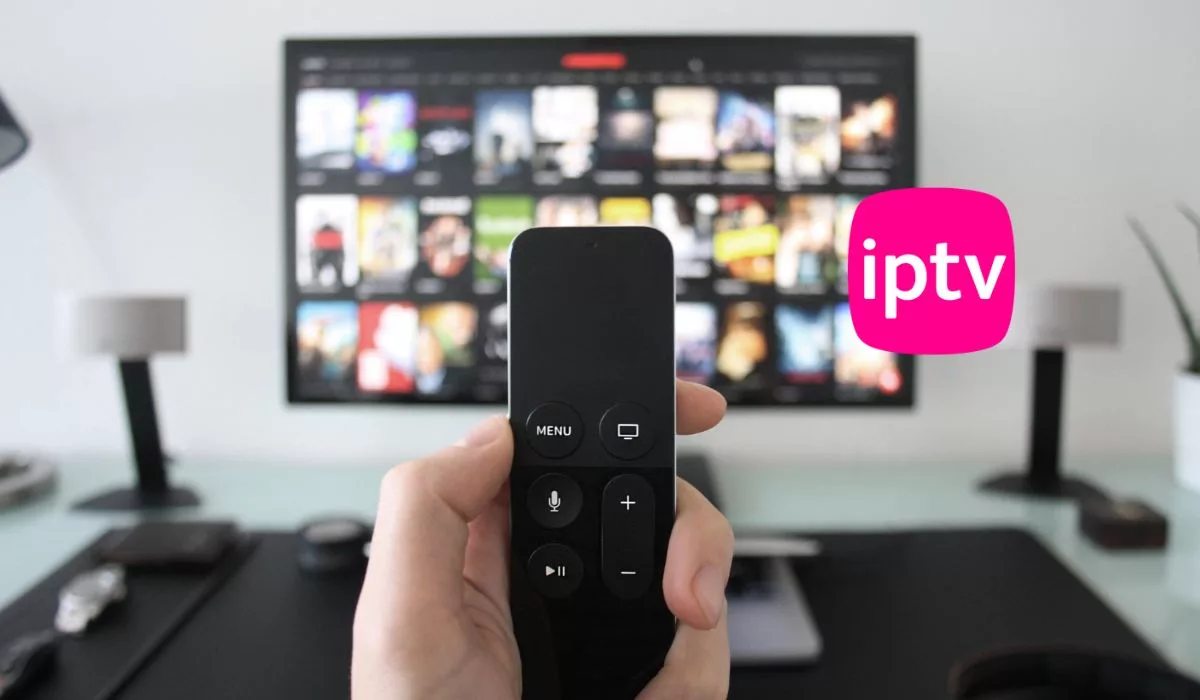
Embarking on the IPTV GitHub journey is akin to stepping into a new realm of television experience. Here’s how you can begin:
- Creating a GitHub Account:
- If you’re new to GitHub, start by creating an account on the GitHub website.
- It’s a simple process that requires you to fill in your details and verify your email.
- Navigating to IPTV GitHub Repository:
- Once you have your GitHub account set up, navigate to the IPTV GitHub repository by using the provided link or simply searching for IPTV on GitHub.
- You’ll find a myriad of IPTV playlists here, each promising a unique bouquet of channels. Visit this link.
- Choosing Your Preferred Playlist:
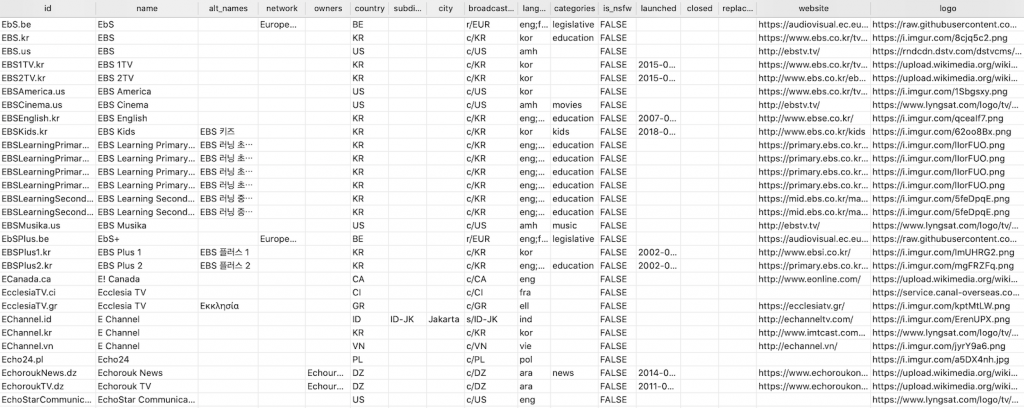
- The IPTV GitHub repository has a massive list of playlists, categorized based on countries and genres.
- Browse through the list and select a playlist that catches your fancy.
- Downloading the Playlist:
- After selecting your desired playlist, click on it to download the file.
- This file contains the links to the IPTV channels and is essential for streaming the content.
- Using an IPTV Player:
- To stream the channels, you’ll need an IPTV player.
- There are numerous free and paid IPTV players available. Download and install one that suits your preferences.
- Loading the Playlist:
- Open the IPTV player and load the downloaded playlist file.
- Voila! You now have access to a plethora of channels from across the globe.
Also read: Best Tetris Unblocked Games Premium for Android & iOS

The communal spirit of IPTV GitHub ensures that the playlists are constantly updated and verified to provide a seamless viewing experience. The open-source nature of GitHub allows for collaborative verification, ensuring that the playlists are functioning as they should.
However, the performance of IPTV GitHub may depend on the stability of your internet connection and the capability of your IPTV player. It’s a collaborative venture where the community and technology come together to ensure a smooth sail in the digital television ocean.
The journey through IPTV GitHub is indeed a promise of a rich and diverse television viewing experience. As you navigate through the digital waves, each click unveils a new horizon waiting to be explored.
If you love games then check this awesome List of New Tyrone’s Unblocked Games.
Troubleshooting Common Hurdles
As with any digital adventure, you might encounter some bumps along the way. However, fret not! The IPTV GitHub community and various forums harbor solutions to common issues. Here are a few troubleshooting steps to ensure a smooth streaming experience:
- Poor Streaming Quality or Buffering Issues:
- Check your internet connection. A stable and high-speed connection is crucial for a buffer-free streaming experience.
- Try a different IPTV player. Some players are better optimized for streaming.
- Channel Not Working:
- Update your playlist. The community often updates the IPTV GitHub repository to remove non-working links and add new ones.
- Report the issue on GitHub. Your feedback contributes to the continuous improvement of the repository.
- Unable to Access Certain Channels:
- Ensure your IPTV player supports the necessary codecs and streaming protocols.
You may like: Unblocked Games Premium | What is it and How to Play These Games
Contributing to IPTV GitHub
The IPTV GitHub repository thrives on the spirit of community. It’s a symbiotic space where you can not only consume but also contribute. Here’s how you can be a part of this digital camaraderie:
- Sharing New Playlists:
- If you come across exciting IPTV playlists, share them on the repository. It’s about widening the horizon for everyone.
- Reporting Issues:
- Found a dead link or facing technical issues? Report them on GitHub to alert the community.
- Improving Existing Playlists:
- Have the skills to curate better playlists or enhance the existing ones? Your expertise could significantly uplift the IPTV GitHub experience.
Please have a look at the What is TTU Blackboard?
IPTV Github Updated links USA
If you’re searching for updated IPTV links for the USA that are hosted on GitHub, we have some here.
For accurate and up-to-date links, I recommend checking GitHub directly or using trusted forums and communities that focus on legal IPTV services. These platforms often have up-to-date information and can guide you towards legal and reliable sources for IPTV content. However check these links:
ATSC Channels
| S.No. | Channel | EPG id | IPTV Github Link |
|---|---|---|---|
| 1 | Buzzr Ⓖ | Buzzr.us | https://buzzrota-web.amagi.tv/playlist480.m3u8 |
DVB-S
| S.No. | Channel | IPTV Github Link (m3u) | |
|---|---|---|---|
| 1 | CNBC Ⓨ | https://www.youtube.com/c/CNBC/live | CNBC.us |
| 2 | Bloomberg | https://bloomberg.com/media-manifest/streams/us.m3u8 | BloombergTelevision.us |
| 3 | CBS News | https://cbsnews.akamaized.net/hls/live/2020607/cbsnlineup_8/master.m3u8 | CBSNews.us |
| 4 | NASA TV Media | https://ntv2.akamaized.net/hls/live/2013923/NASA-NTV2-HLS/master.m3u8 | NASATVMedia.us |
Transform ideas into impact! Write for us technology and be the tech voice that guides the future.
Embracing the Future of Television
The expedition through IPTV GitHub is more than just a quest for diverse content; it’s about being a part of a digital movement that’s reshaping the television landscape. As you delve deeper into this realm, you’ll discover that the essence of global television is now not in the clutches of hefty cable subscriptions but in the collaborative spirit of the digital age.
Your engagement with IPTV GitHub isn’t merely passive consumption; it’s an active participation in a community that’s democratizing access to global television content. So, as you explore the boundless channels on IPTV GitHub, remember that you are also a vital part of this ever-evolving digital narrative.
How to use an IPTV GitHub M3U playlist: practical checks for 2026
This section expands the basic setup above. It covers the difference between a playlist, a player and a broadcaster; how to import an authorized playlist; and how to separate a bad file from a stream that is unavailable. It does not certify the older USA channel URLs or promise a particular channel count.
Choose the IPTV source before choosing a player
“IPTV GitHub” is a search term, not the name of a single television provider. GitHub hosts many unrelated projects. The iptv-org/iptv project describes its collection as user-submitted links to publicly available streams. The repository hosts links, not the video itself, and it does not control the broadcaster’s server. Its legal statement describes the maintainers’ understanding of those links, not a legal clearance for every viewer.
Prefer a broadcaster’s own viewing page or an M3U URL the provider explicitly permits you to use. When considering a community playlist, check the repository owner, README, issue history and stated source of the stream. A familiar logo, a large star count or a file named “free” does not establish permission. If permission or access conditions are unclear, use the broadcaster’s official app or website instead.
Readers searching for “what is IPTV GitHub gratis” should make the same distinction: free access to a repository does not mean every channel is free to watch in every country. A project license for code or playlist data is not a license to redistribute the television programmes.
M3U playlist, M3U8 stream and GitHub page: which link should you import?
| What you have | What it means | What to check |
|---|---|---|
| A GitHub repository or file-view page | A web page about a project or file | Do not mistake a page full of HTML for the playlist data. Follow the project’s documented playlist link. |
| An M3U playlist | A text list of media locations, often with channel labels | Confirm the file contains playlist text, not a login page or an error message. |
| An M3U8 URL | May be a UTF-8 playlist or an HLS stream manifest | The extension alone cannot tell you whether it is a channel directory or one adaptive stream. |
| A player or player source-code repository | Software that opens media | A player does not supply a subscription, credentials or broadcast rights. |
The project FAQ says its channel database and its playable playlists are different: a channel may exist in the database without an available stream. This is why a search for “CNN IPTV GitHub”, or any specific channel, is not evidence that a permitted working feed exists. Check that broadcaster’s official viewing options rather than looking for replacement access tokens.
Import an authorized playlist into VLC on a desktop
The steps and screenshots here follow VideoLAN’s VLC 3.0 desktop documentation. They show the Windows-style interface, not a hands-on test of any channel. Names and layout can differ on other operating systems or releases.
- Install VLC from VideoLAN’s official website, not from an advertisement for a “GitHub IPTV player”.
- Copy the playlist URL supplied by the authorized provider. Copy the complete URL without surrounding quotes, spaces or extra punctuation. Do not share URLs that contain your private subscription tokens.
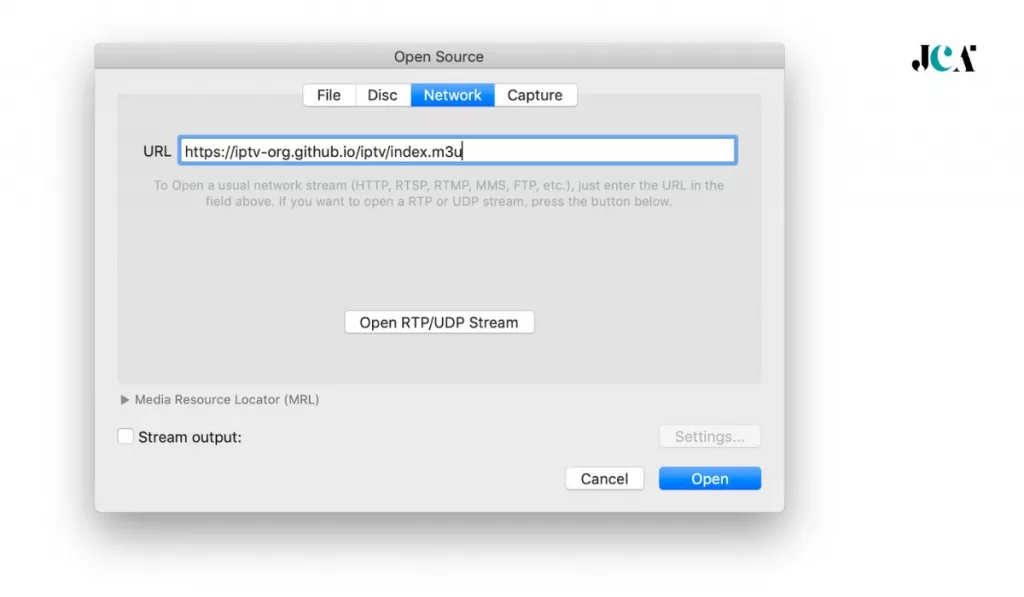
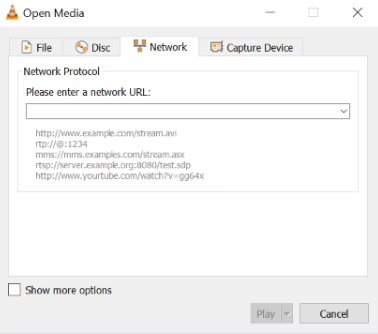
- In VLC, select Media > Open Network Stream.
- In the Network tab, paste the URL into the network URL field and select Play.
- If VLC opens a directory playlist, inspect its entries before selecting a channel you are allowed to watch. Loading names into the playlist does not prove that the underlying streams will play.
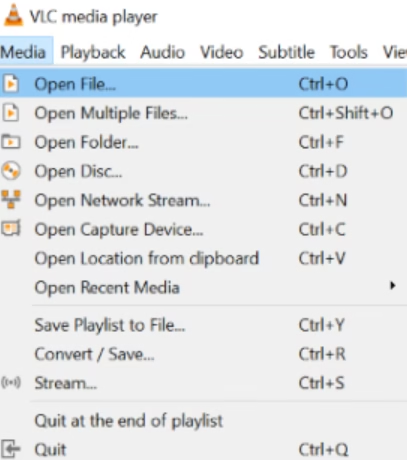
For a downloaded playlist file, use Media > Open File and select the local file. An online playlist URL can reflect future provider updates; a downloaded copy remains a snapshot until you replace it. Neither option guarantees continuous playback.
Import an authorized M3U into Kodi’s IPTV Simple Client
Kodi’s official add-on page lists the installation route as Settings > Add-ons > Install from repository > PVR clients > PVR IPTV Simple Client > Install. Use the official repository. This add-on supports M3U playlists and XMLTV guide data; it is not a channel subscription.
Open the installed client’s configuration. According to the maintainer’s settings documentation, set the playlist Location to Remote path for an online resource and enter the authorized URL under M3U play list URL. For a file on your device, choose Local path and provide the M3U play list path. Follow any save or restart prompt your version displays. Labels and instance-management screens can vary by Kodi/add-on release.
An XMLTV guide is separate from the M3U playlist. A blank programme guide does not necessarily mean the video is broken. Guide-channel identifiers must match the playlist identifiers; the maintainer documents fields such as tvg-id for this purpose. Do not invent guide URLs or reuse another subscriber’s credentials.
Android players and IPTV Smarters: avoid mixing up software with a source
The historical searches include “GitHub IPTV player Android”, “IPTV Smarters GitHub”, “IPTV Smarters source code” and “IPTV Smarters playlist GitHub”. These are different questions. A GitHub project can be a channel list, an unrelated player, or code for an application. This guide does not identify random repositories as official IPTV Smarters software, and it does not supply an Xtream login or a paid-service account.
On Android or a TV box, use a player obtained from its official distribution channel and follow that version’s own playlist-import instructions. Confirm it accepts the format your authorized provider supplies before entering a URL. Do not install unknown APKs or grant unusual permissions just because a repository promises more channels. When a player asks for provider credentials, a public M3U link is not a substitute for those credentials.
Validate the playlist before blaming your connection
- Check what was downloaded. Open the file in a plain-text viewer. An extended M3U commonly begins with
#EXTM3U; channel metadata commonly uses#EXTINF, followed by a media URL. A page beginning with HTML markup, a login form or an error message is not the intended playlist. - Check the source and access conditions. Confirm that the provider permits the stream in your location and player. Do not edit tokens or headers to defeat an access restriction.
- Test a small sample. Open one authorized entry and watch long enough to notice interruptions. A list of thousands of channel names is not a result from testing thousands of streams.
- Separate syntax from playback. A correctly formatted M3U can still point to unavailable media. Conversely, one failed channel does not establish that the whole playlist is invalid.
- Record the date and result. Note the player/version, channel, time and visible error. Avoid publishing private URLs or subscription details in an issue report.
The project’s contribution documentation distinguishes playlist syntax/metadata checks from stream tests and includes labels such as “Geo-blocked” and “Not 24/7”. Those labels explain why availability can vary. They are not invitations to work around restrictions.
Broken-stream troubleshooting: match the next step to the symptom
| Symptom | Useful check | Safe next step |
|---|---|---|
| No channels appear | Is this the actual playlist resource, or a GitHub/HTML page? | Re-copy the provider’s documented URL or open the correct local M3U file. |
| Names load, but one channel fails | Does the broadcaster’s official viewing page work, and is the stream available at this time? | Check its current access conditions. A changed, offline or part-time feed may need a provider update. |
| HTTP 401 or 403 | Is authorization required or access restricted? | Use the provider’s supported app/login or stop. These errors are not permission to bypass access controls. |
| HTTP 404 or 410 | Is the media location missing or retired? | Get the current permitted link from the provider. Repeatedly retrying an obsolete address will not restore it. |
| Playback starts, then buffers | Does another permitted feed work on the same connection? Does the official player also struggle? | Compare a small sample and use a lower-quality option only when the provider offers one. The origin server can be the bottleneck. |
| Video works, guide is blank | Is the XMLTV source configured, and do the identifiers match? | Fix the guide configuration separately instead of replacing a working video source. |
| Works on desktop, not TV/Android | Does the device/player support the stream’s format? | Use the provider’s supported player or check the player’s own documentation. Do not assume every M3U-capable app supports every media format. |
For more detail in VLC’s Windows-style desktop interface, the project’s contribution guide points to Tools > Messages. Inspect the error log for the failed entry, then redact tokens and personal information before reporting it. Do not run repeated bulk checks against broadcaster servers just to claim that a large playlist is “100% working”.
Legal and availability limits worth keeping in mind
Public reachability, free pricing, a GitHub host and a working video are four different facts. None alone proves permission. Check the broadcaster’s terms, the intended audience and local rules. If a stream requires a subscription, DRM, an official app or a specific region, use that permitted route. This guide does not provide legal advice or certify every link in a community collection.
Do not expect every live channel, on-demand film or premium sports event to be included. The project FAQ says it does not plan to add video on demand and that not all television channels are available online. Older channel tables are historical examples, not a current catalogue. For ongoing viewing, the broadcaster’s official website or licensed service is the better source of current availability.



Leave a Reply