


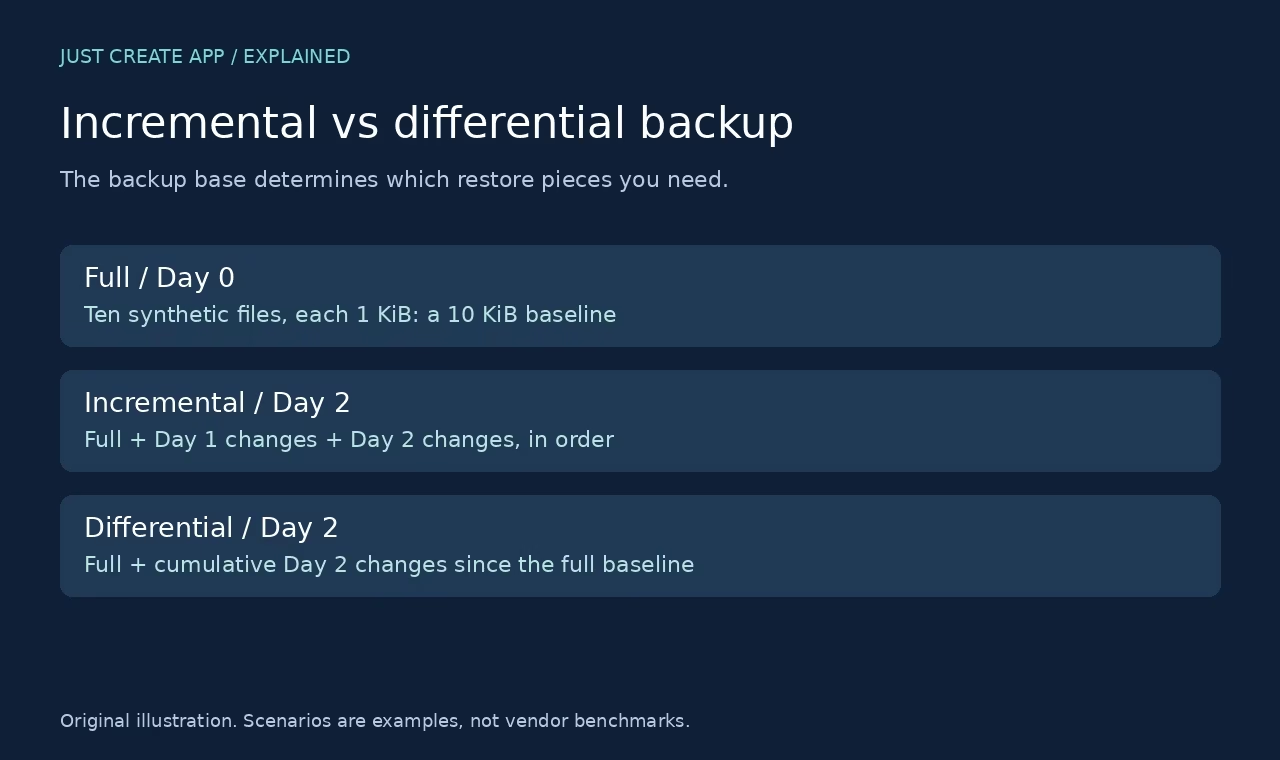

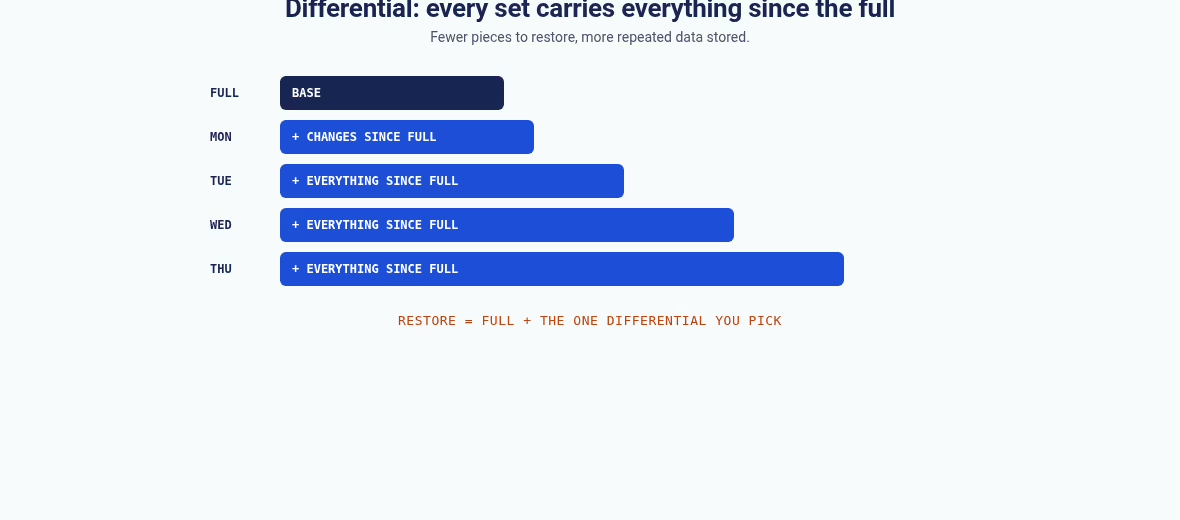
Incremental and differential backups both avoid copying everything every time. The difference is one thing: the reference point. An incremental saves changes since the previous backup in its chain. A differential saves changes since the full backup it is based on.
That single choice decides how fast storage grows, which pieces a restore needs, and what breaks when one piece goes missing. I have seen teams argue about backup products for weeks when the real problem was that nobody had agreed on this reference point or tested a restore. It is the same ownership gap that shows up across the app operations guides on this site.
This guide explains the mechanics with a small file-level example you can reproduce yourself, the arithmetic behind storage growth, and the engine-specific rules from primary documentation. It is about concepts, not a benchmark of any commercial backup product.
The core difference in one table
| Question | Incremental | Differential |
|---|---|---|
| Reference point | Usually the previous backup in the chain | The full backup base |
| What a later backup holds | Changes since the preceding backup | Cumulative changes since the full |
| Logical restore | Full plus each required incremental in order | Full plus the selected differential |
| A missing earlier change set | Can break every later restore in the chain | Earlier differentials are generally not needed |
| Storage tendency | Each new set stays small | Each new set grows as changes accumulate |
| Implementation caveat | Synthetic fulls and merging can hide the chain | The correct base full still matters |
These are conceptual descriptions. Real backup software can use forever-incremental storage, synthetic fulls, deduplication, and changed-block tracking. The restore interface may hide the chain from the operator. Hidden dependencies still deserve testing, so read the product documentation before assuming the same names mean the same files. And when a backup job does fail at 3 AM, the alert should land in your help desk software or on-call queue, not in a mailbox nobody reads until morning.
How the three backup types build on each other
The full backup creates a recovery base
Every chain starts from a full backup. For a database, a real full backup is more than copying whichever files are convenient while the engine runs. The engine or the backup tool must produce a recoverable state.
Application consistency, transaction logs, encryption keys, and the restore procedure matter even when every job reports success. Keys and backup-console credentials belong in a managed vault, the same category covered in our password manager roundup – a backup you cannot decrypt is not a backup. If you are still choosing a tech stack for a new product, decide at this point who owns backup verification, because it is much harder to bolt on later.
Incremental saves the next delta
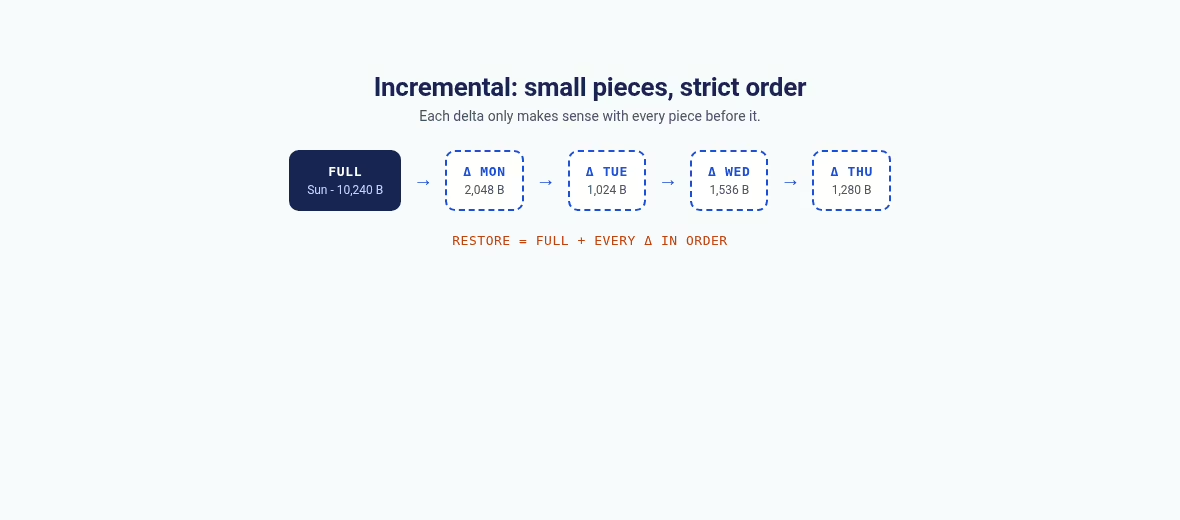
Picture a full baseline of ten small files. On Day 1, one file changes and one new file appears. The Day 1 incremental holds those two files. On Day 2, another file changes and one is deleted. The Day 2 incremental holds that changed file plus a deletion record.
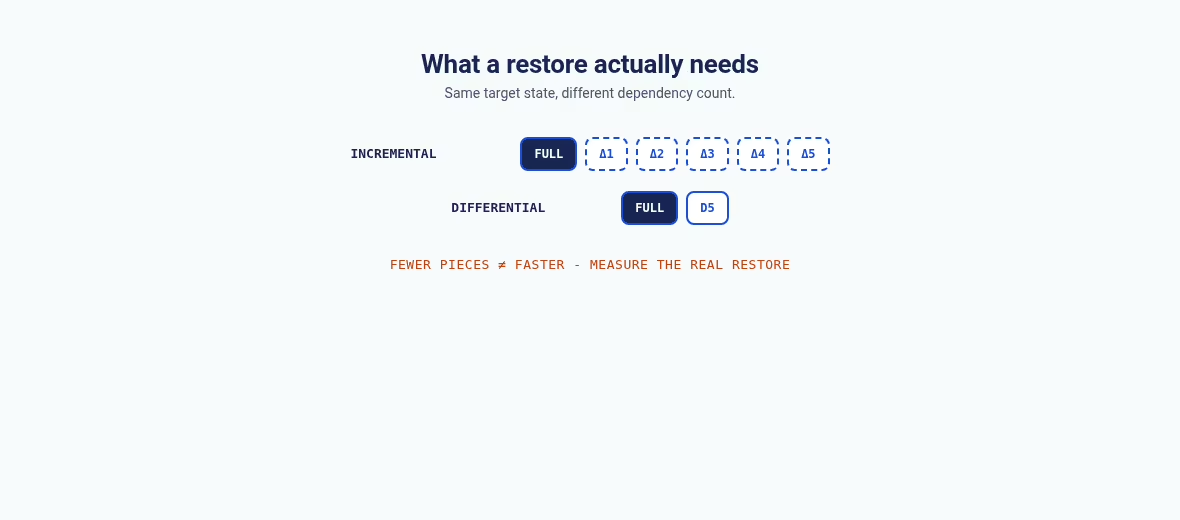
Restoring to Day 2 requires the full base, the Day 1 delta, and the Day 2 delta, applied in sequence. Each piece is small, but every piece is load-bearing.
Differential saves changes from the full base
The Day 2 differential compares the current state with the original full baseline instead of with the previous backup. It therefore carries the current versions of every file changed since the full, plus the deletion record.
Restoring from the full plus that one cumulative set reaches Day 2 without needing the Day 1 differential at all. That is the logical reason a differential restore can involve fewer backup sets.
A worked file-level example
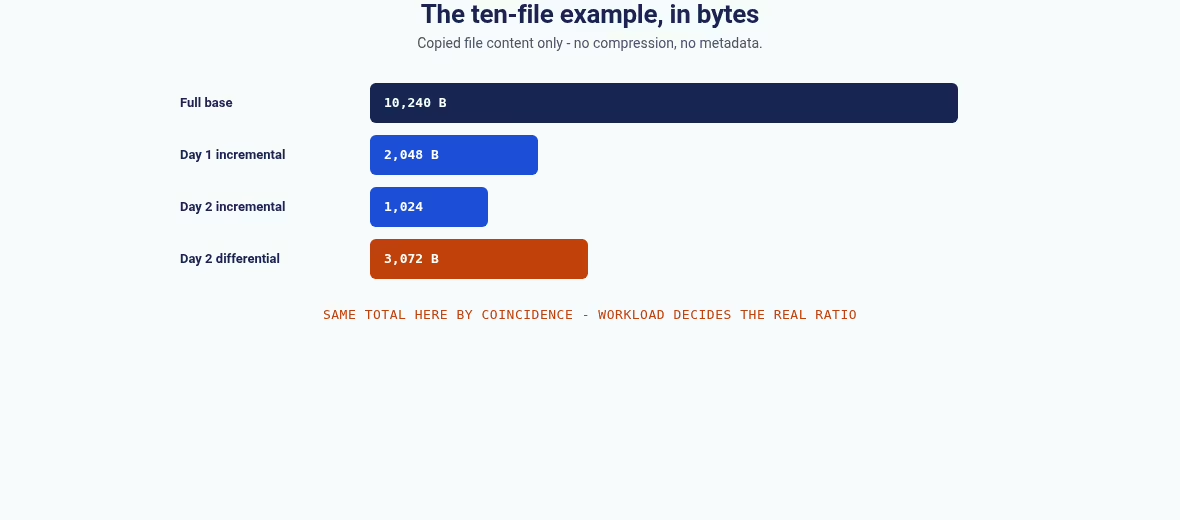
You can demonstrate the whole dependency story on a laptop with ten text files of 1,024 bytes each, for 10,240 bytes of content. No customer data, no database, no benchmark. Just files, folders, and a hash check. Scripting a small drill like this is also a good first job for the automation tools your team already runs, because a check that runs itself actually gets run.
The example writes a full baseline, a Day 1 state, and a Day 2 state. It compares file hashes to build changed-file and deletion manifests, writes the delta folders, and restores both strategies into fresh directories. The restored names and SHA-256 hashes are then compared with the Day 2 target.
| Step in the example | File-content bytes | What it shows |
|---|---|---|
| Full base | 10,240 | Ten initial files of 1,024 bytes each |
| Day 1 incremental | 2,048 | One changed file plus one new file |
| Day 2 incremental | 1,024 | One changed file, plus a deletion manifest |
| Day 2 differential | 3,072 | Three changed or new files since the full, plus manifest |
| Correct incremental restore | 10 hashes match | Full + Day 1 + Day 2 reproduces the target |
| Correct differential restore | 10 hashes match | Full + Day 2 differential reproduces the same target |
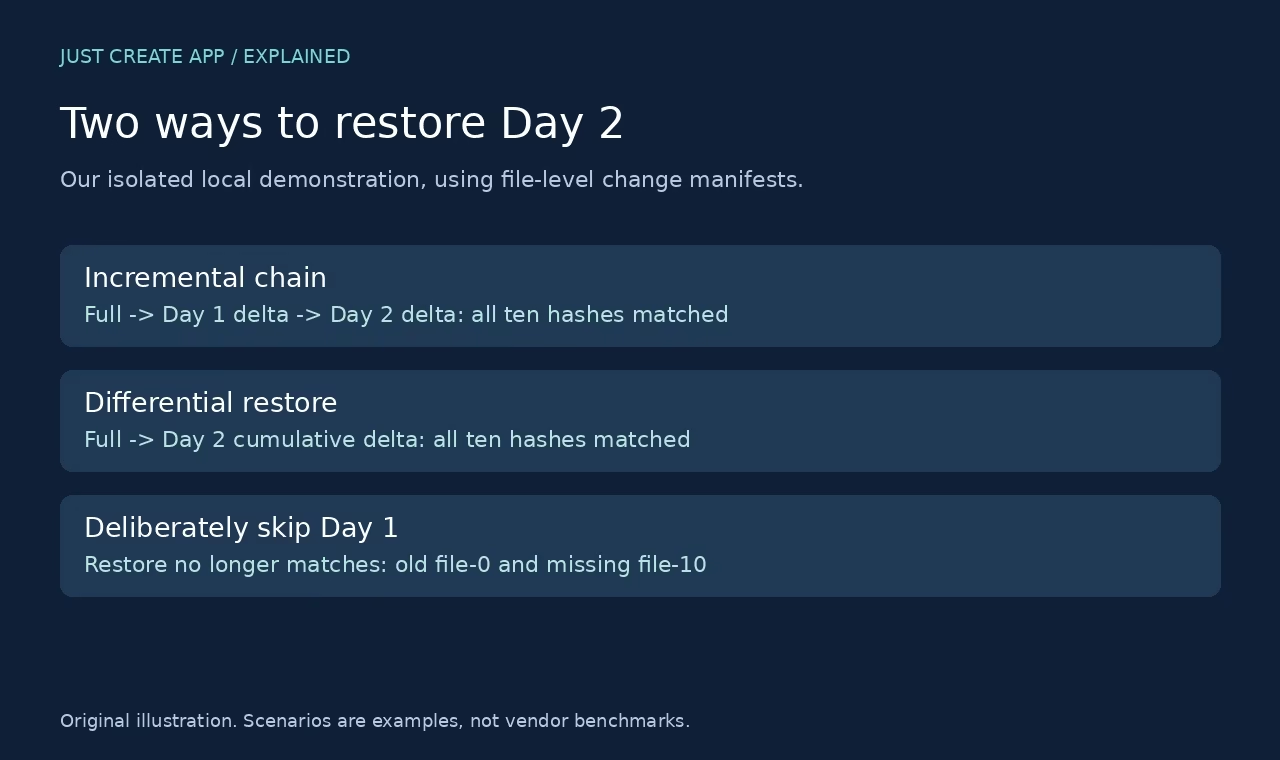
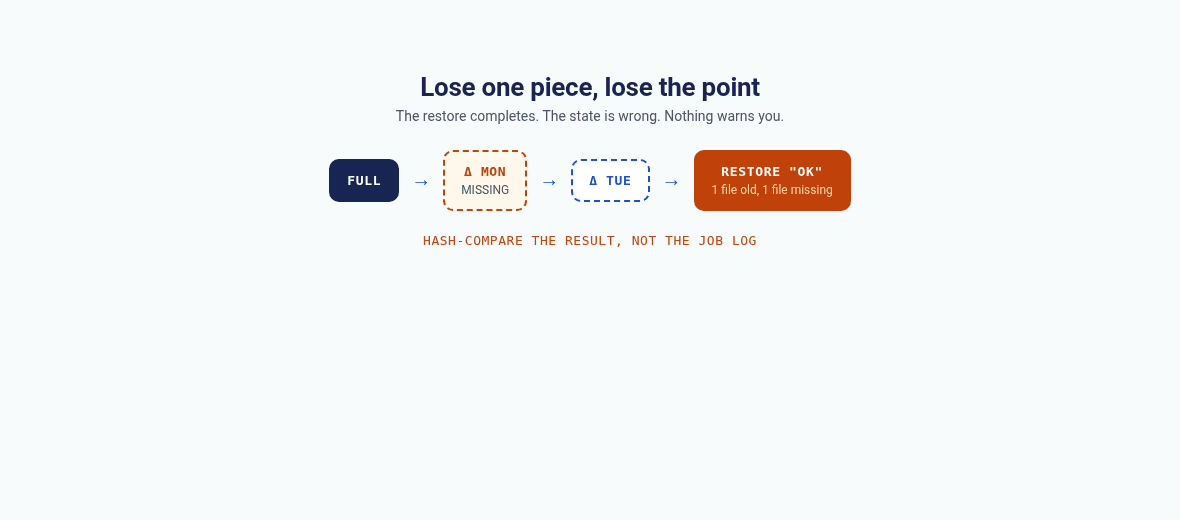
| Full + Day 2 incremental only | Does not match | One file stays old, one file is missing |
Two details are worth noticing. First, the byte counts cover copied file content only. They exclude manifests, directory metadata, and filesystem overhead, and there is no compression or deduplication in the example. Capacity math is multiplication all the way down, the same lesson as the dedicated vs shared hosting breakdown.
Second, the two incremental payloads here total 3,072 bytes, the same as the Day 2 differential. That is a property of this tiny workload, not a rule. Workload shape decides which strategy stores more, as the next section shows.
The failure case deserves a picture of its own. When the Day 1 incremental is left out, the restore still completes without an error in the example script. It simply produces the wrong state: one file is an old version, and one file never arrives. Nothing looks broken until you compare hashes.
That is exactly how chain breaks show up in production – silently, on the day someone actually needs the restore. A backup job log that says success tells you a file was written. It does not tell you the chain is whole. The same caveat applies to every monitoring dashboard in the Databox alternatives roundup: green means a job ran, not that a restore works.
Why the workload changes the answer
Whether you run backups in-house or through one of the top IT outsourcing companies, the sizing question is the same: how much changes, and where. Two opposite workloads make the point.
When each day changes a new part of the dataset
Take a hypothetical 100 GB full base and 5 GB of newly changed data on each of five days, with no overlaps and no compression. Five incremental change sets would be 5 GB each, totaling 25 GB.
Daily differentials would be 5, 10, 15, 20, and 25 GB, totaling 75 GB if all five are retained. The final differential alone is 25 GB, because every differential repeats earlier changed material in this model.
These are arithmetic examples, not measurements from a backup engine. Retention policy decides how many of those sets you keep, and a product with deduplication may store the logical repeats differently. Do not estimate a storage bill from this math without knowing the product’s storage model. Capacity planning here has the same shape as choosing between dedicated and shared hosting: the sticker price only makes sense once you know what is actually being multiplied.

When the same small area changes repeatedly
If the same 5 GB changes every day, the latest differential may still hold roughly that same changed area relative to the full, while separate daily incrementals each capture a new version. That is the opposite storage pattern from disjoint daily changes.
Whole-file backup also behaves differently from changed-block backup when a small edit lands inside a huge file. A one-line change to a 50 GB virtual machine image can mean copying the whole file again, or copying one changed block, depending on the tool.
Measure your own change rate and dataset composition before choosing. Databases, virtual machine images, and document folders all produce different behavior. Keep three numbers separate in your notes: the size of the source dataset, the logical change set, and the physical stored backup. Compression, deduplication, and retention are distinct inputs, not automatic properties of the words incremental or differential.
Teams running structured data programs usually already think this way about change rate. The same discipline behind data governance – named owners, known definitions, measured change – is what makes backup sizing predictable. The cloud-native SaaS builders who instrument everything else tend to be the ones who can tell you their daily change rate without guessing.
Engine-specific rules from primary documentation
SQL Server’s documentation describes a differential in terms of changes since its differential base, and its restore guidance requires the relevant full base before the differential. A copy-only full does not become a new differential base in the same way a conventional full does.
So do not pick a full backup by timestamp alone without checking which base the differential actually depends on. The engine tracks that relationship in metadata, not in file names.

MySQL Enterprise Backup’s incremental backup documentation describes base selection through log sequence numbers and backup history, with full-scan, page-tracking, and redo-log-only approaches that carry different requirements. It also notes that changed InnoDB pages are the unit of incremental change, not changed rows.
That is why a small logical edit need not produce an equally small physical backup. The SQL Server differential backup reference makes the equivalent point for its engine. These are two examples, not a compatibility matrix – use the actual documentation for whatever you run. Validating those engine-specific restore rules against your own setup is routine work for IT architecture consulting firms, and worth an afternoon even if you never hire one.
Product-level features move the lines further. Forever-incremental storage keeps one chain and avoids new fulls. Synthetic fulls assemble a new full from earlier pieces without re-reading the source. Both change what “the chain” physically means while keeping the same logical dependency: some set of earlier pieces must still exist and agree. For an application with several services, include external objects and secrets required for recovery rather than backing up the database alone.
Document which base each chain depends on and who owns it. A risk register is a good home for that dependency list, because a backup chain nobody can reconstruct is a liability dressed as an asset.

What a small example proves, and what it does not
| Area | What the example shows | Limit |
|---|---|---|
| Restore dependency | Both correct chains reproduce the target | One file-level model, not a vendor restore engine |
| Integrity | Names and SHA-256 hashes match | No metadata, permissions, or database consistency claim |
| Missing set | Omitting a delta produces a wrong state | Some products merge chains or synthesize fulls |
| Storage | Exact content bytes counted | No compression, deduplication, or metadata measured |
| Recovery speed | Not measured | No claim that one method restores faster in production |
Keep that last row in mind whenever a vendor compares restore speeds. Restore time includes transfer, validation, replay, and application startup. The only number that matters is the one from a drill on your own recovery infrastructure. A dashboard from one of the Databox alternatives can tell you a job failed or a repository filled up; it cannot tell you the backup restores.
Choosing a strategy around recovery requirements
Start with recovery point and recovery time
Recovery point objective is the amount of recent data you can afford to lose. Recovery time objective is how quickly the service needs to be back. More frequent backups narrow the data-loss window, but only if they succeed, stay usable, and are retained.
A shorter restore chain can help, but the actual restore time includes far more than applying backup sets. Keep the distinction between availability and recovery clear: our load balancer explainer covers keeping a service live, which is a separate problem from getting its data back. Choose a schedule and retention policy that match those objectives, then prove them with a realistic restore. Teams that run production systems often bring in outside help for this; the better DevOps consulting companies will insist on a restore drill before they sign off on any schedule.
Do not claim a recovery time from the time it takes to create a backup. The restore destination, network speed, encryption keys, and operator readiness dominate the recovery event. Redundant app servers behind solid load balancer software do nothing for a corrupted database.

Frequency is the other half of the recovery point. A nightly incremental gives you a 24-hour worst-case loss window. If the business cannot accept that, the answer is more frequent backups or log shipping, not a different delta format. Write the objective down as a number before you touch a schedule, and share it with whoever owns the budget, because retention and frequency are what drive the storage bill.
Account for retention, keys, and ransomware risk
A backup that depends on a deleted base is unusable. Keep each needed chain intact for the intended retention period and verify expiration rules. Protect the backup account and the encryption keys separately, and keep copies outside the failure boundary of the production system.
Incremental versus differential describes change selection, not whether the copy resists deletion or a compromised administrator. Credential hygiene matters here too: the vault holding backup-console credentials should itself be recoverable, with more than one trusted person able to reach it.

Multi-cloud designs add another boundary question. If your stack already spans providers, as in the Azure Front Door vs CloudFront comparison or a multi-cloud architecture, decide which provider failure your backups must survive before picking tools. Hosting-level snapshots, whether on your own server or a platform like Render, are a convenience layer, not a recovery plan.
A restore drill you can repeat before trusting the schedule
Restore into an isolated destination
Use a safe test destination and never overwrite production data. Record the recovery point you chose and the backup sets or restore job you used.
Confirm file counts, critical content, and application-level behavior. For a database, follow the engine’s consistency process and validate real queries or user workflows. Byte integrity alone does not prove the application can operate.
Exercise the missing pieces and document the result
Check the catalog, credentials, and encryption keys, then test a controlled missing-set scenario on a disposable copy. Watch how the tool reports the failure.
Write down which backups depend on which base and who owns the recovery procedure. Failed launches usually trace back to exactly this kind of unowned dependency – the pattern shows up in why CRM projects fail as well.
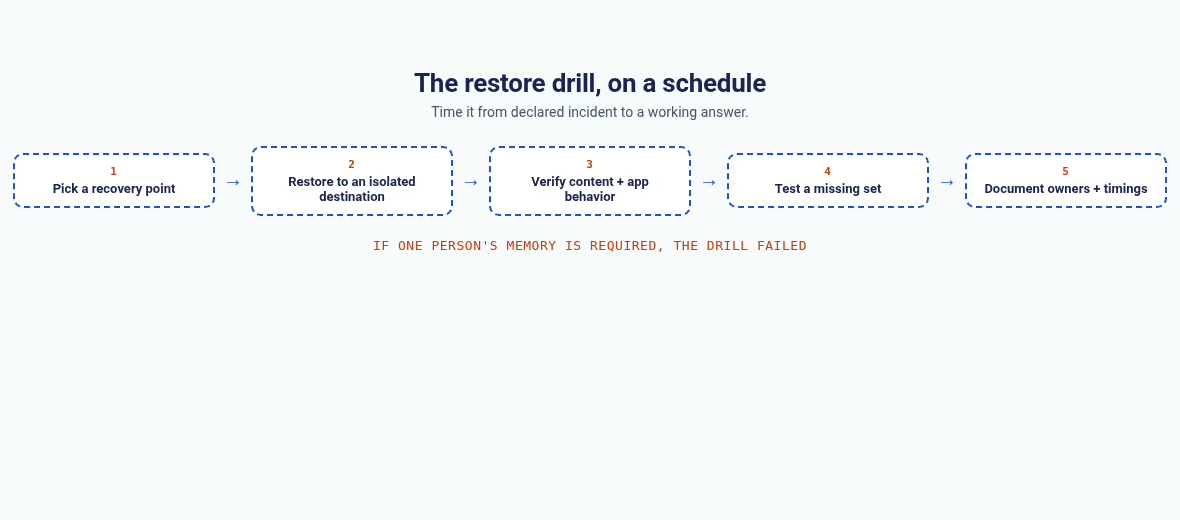
Time the drill from the moment you declare the incident to the moment the application answers a real request. That number, not the backup job’s throughput, is your honest recovery time. If the drill depends on one person’s memory, the documentation step has failed – write the runbook so a colleague can finish the restore without you.
Run the drill on a schedule, not once. Teams change, tools change, and retention rules expire. More operational guides like this one live in the Apps section.
Frequently asked questions
Which is better, incremental or differential backup?
Neither is best for every workload. Incremental strategies keep each new change set small but create chain dependencies. Differential strategies use a full base and cumulative changes, often reducing the sets needed for a restore. Physical storage and recovery behavior depend on the tool, the change pattern, and retention. Choose against recovery objectives and a tested restore, not the method name. Related operational guides live in the Apps section.
Can I restore the latest incremental without earlier backups?
In a straightforward chain, no. The latest delta contains only changes since its immediate reference point. In the worked example, restoring the full plus Day 2 while omitting Day 1 leaves one file old and one file missing. Some products merge chains or build synthetic fulls, so follow their documented restore procedure rather than applying this example blindly.
Does a differential need every earlier differential?
In the usual full-base model, no. A selected differential contains cumulative changes since the full base, so earlier differentials are not needed for that restore. The correct full base is still required, and database tools may track that base through metadata rather than whichever full file looks newest.
Is differential backup always faster to restore?
It is not guaranteed. Applying fewer logical sets may help, but transfer size, storage throughput, compression, database replay, and product design all affect the total. A modern backup interface may reconstruct an incremental chain efficiently. Measure a realistic restore and include application validation in the recovery time. If that measurement work needs outside help, the DevOps consulting companies that handle reliability work will typically start with exactly this kind of restore test.
Why can the differential grow through the week?
It captures cumulative changes relative to its full base. When additional parts of the dataset change, that cumulative set tends to grow. Repeated edits to the same blocks and deduplication can change the physical growth. The disjoint-change calculation above is a teaching example, not a universal growth curve – measure your actual workload.
Do incremental or differential backups protect against ransomware?
The change-selection method alone does not establish protection. An attacker who can delete or encrypt the backups can harm either strategy. Account separation, immutable or isolated copies, retention, and tested recovery matter. Keep credentials and encryption keys available for a legitimate recovery while limiting who can change or delete retained backups; a managed vault such as the ones in our password manager roundup is the right home for them.
What does the small file-level example actually verify?
It verifies dependency logic, nothing more. Ten synthetic baseline files, changed and added files on Day 1, changed and deleted files on Day 2, then both strategies restored to fresh folders. The two correct restores match all ten target hashes and names, and skipping Day 1 in the incremental chain fails the comparison. It benchmarks no backup product and no database. For monitoring the jobs themselves once they run in production, the dashboard tools in our Databox alternatives roundup are the usual starting point.
What should I check before changing a backup schedule?
Check recovery objectives, retention, the required full base, storage capacity, encryption-key availability, and the tool’s restore instructions. Run a restore drill on isolated infrastructure before relying on the new schedule, and confirm application-level correctness, not only job success. Keep the existing usable recovery path until the new one has been proved.






Leave a Reply