




QuickBooks does not slow down because Intuit wrote lazy code. It slows down because the company file outgrew the machine it lives on. A 40 MB file that opened in three seconds when you were a two-person shop turns into a 700 MB bottleneck once inventory, payroll history and five years of transactions pile up – and every extra user who logs in multiplies the strain. The hosting model you choose decides whether that growth stays invisible or starts eating billable hours. This 2026 guide compares dedicated and shared hosting for QuickBooks on the four axes that actually matter – performance, cost, security and headroom – and gives you a decision framework you can finish in an afternoon.
Updated October 22, 2026. Pricing and performance figures below are typical market ranges gathered from current provider pricing pages and vendor documentation, not hands-on benchmarks run by our team. Your quotes will vary by region, user count and contract length.
Why infrastructure dictates QuickBooks performance
QuickBooks Desktop is a file-based database application. Every invoice, journal entry and inventory adjustment lands in a single company file, and every connected workstation reads and writes that file constantly. That architecture has three consequences most owners discover the hard way.
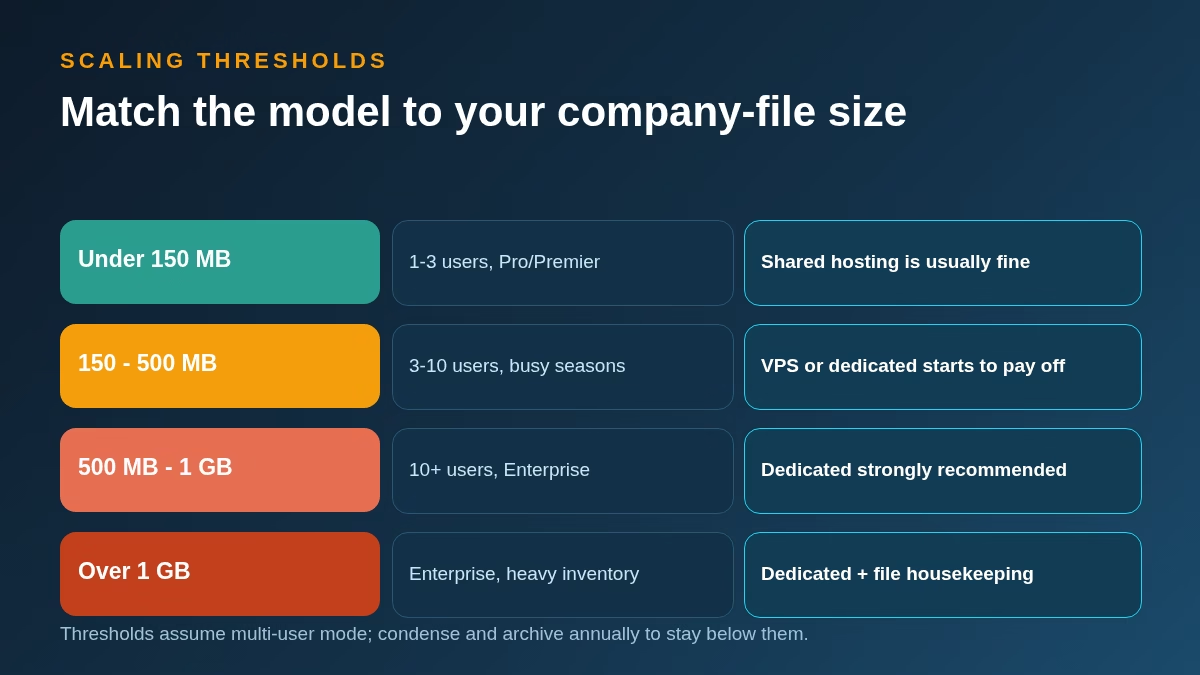
First, file size compounds. Intuit’s own guidance keeps Pro and Premier files comfortable under roughly 150 to 200 MB, while Enterprise is engineered to remain responsive into the hundreds of megabytes and beyond a gigabyte with good housekeeping. Past those zones, list lookups, report builds and condense operations stretch from seconds into minutes.
Second, concurrency multiplies latency. Multi-user mode serialises access to the file. On a healthy machine with fast NVMe storage and uncontended RAM, five users posting transactions feels instant. On a crowded shared server where another tenant’s backup job is saturating the disk, the same five users watch spinners.
Third, peak season is the real test. Tax prep, year-end closes and seasonal invoicing spikes are when QuickBooks earns its keep – and exactly when underpowered hosting falls over. A model that feels fine in June can be unusable in March.
The short version: QuickBooks performance is an infrastructure decision before it is a software decision. If your file already crawls, no amount of workstation upgrades will fix a server that cannot feed it. Teams diagnosing recurring slowdowns should also look at their data-protection stack at the same time; our guide to incremental vs differential backup explains why the wrong backup schedule is one of the most common hidden causes of midday lag.
Four ways to host QuickBooks in 2026
Before comparing shared and dedicated head to head, it helps to see the full field. Every QuickBooks setup in 2026 lands in one of four models.
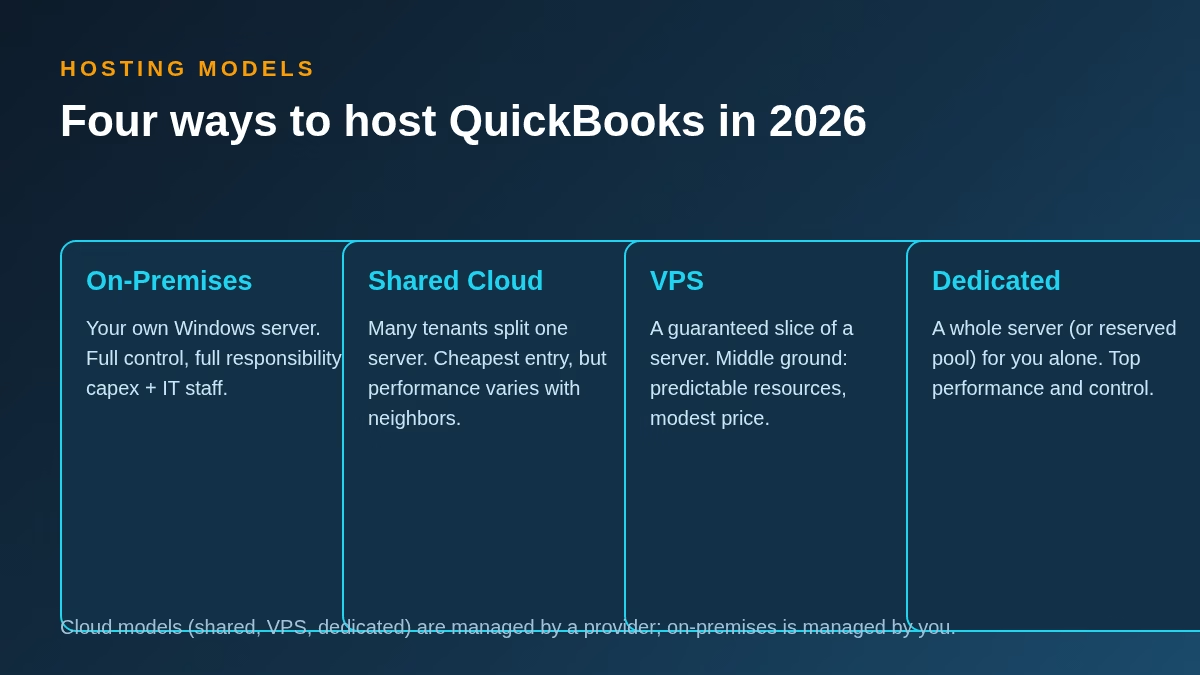
1. On-premises servers
A Windows server in your office or colocation rack. You own the hardware, the licences, the patching and the 2 a.m. failures. On-premises still makes sense for firms with strict data-residency rules or a full-time IT team, but the true cost includes power, warranties, refresh cycles every four to five years and the salary of whoever keeps it alive. Most small and mid-sized firms have moved on.
2. Shared cloud hosting
A hosting provider runs a large Windows Server and carves it into sessions for dozens of customer firms. You rent seats, usually $30 to $60 per user per month, and the provider handles uptime, backups and Windows updates. This is the entry point for most small businesses moving QuickBooks off a desktop, and it is where the shared versus dedicated debate actually lives.
3. VPS slices
A virtual private server gives you a guaranteed allocation of CPU, RAM and storage on a host machine you share at the hardware level but not at the resource level. Virtualisation technology has matured to the point where a well-provisioned VPS behaves like dedicated hardware for most QuickBooks workloads. If you want to understand what sits under the hood, our explainer on hypervisors and VPNs covers the virtualisation layer in plain language.
4. Dedicated servers
An entire physical machine – or a reserved cloud instance with pinned resources – for your firm alone. Every CPU cycle, every gigabyte of RAM and every disk I/O belongs to you. Dedicated is the ceiling of the market: highest cost, highest performance, highest control.
Agencies and product teams that build on cloud infrastructure will recognise the same trade-off ladder from modern deployment platforms; our review of whether Render is a good hosting platform shows how the shared-to-dedicated spectrum looks in the developer world. And if you are weighing a custom build around your accounting stack instead of renting, the firms in our cloud-native SaaS builders roundup are the kind of partners who scope that work.
Shared hosting: the budget-friendly starting point
Shared QuickBooks hosting is the reason a five-person bookkeeping firm can run Enterprise from a beach house. The provider maintains the server farm, the Windows licences, the security patches and the backup jobs; you pay per seat and log in over Remote Desktop or a browser gateway.
Where shared shines
Cost. At $30 to $60 per user per month, a four-person team runs QuickBooks in the cloud for less than the electric bill on an owned server. There is no capital expense, and scaling from three seats to six is an email, not a purchase order.
Zero maintenance. Patches, antivirus, firmware and failed disks are somebody else’s problem. For firms without IT staff, this is the entire value proposition.
Instant onboarding. Most shared providers provision a new seat in hours. Seasonal staff can be added for exactly the months you need them.
Where shared strains
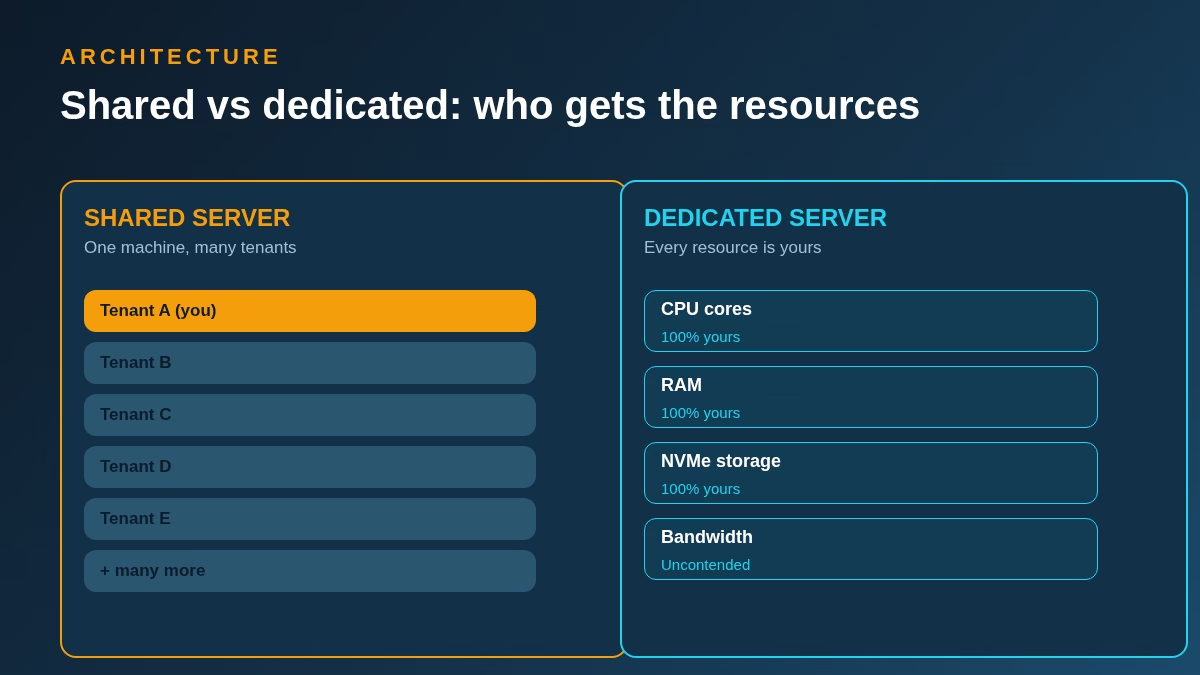
The noisy-neighbour effect. Your session shares CPU, RAM and disk I/O with other firms on the same box. When a neighbour runs a year-end condense at 2 p.m., your report build slows down too. Good providers limit tenants per server and monitor contention; bad ones oversell.
Resource ceilings. Shared plans cap per-user RAM and restrict what you can install. Heavy add-ons – advanced inventory, custom integrations, large third-party apps – may be refused or surcharged.
Less control. Maintenance windows, OS versions and security policy are set for the crowd, not for you. If your industry requires a specific configuration, shared can be a dead end.
Dedicated hosting: performance without crowds
Dedicated hosting removes the neighbours. The machine – physical or a reserved cloud instance – runs your QuickBooks, your add-ons and your users, full stop.
What dedicated buys you
Predictable speed. Report builds, bulk imports and condense operations run at the machine’s full capability at any hour. For files past 500 MB, the difference is not subtle.
Real headroom. A dedicated box with 32 or 64 GB of RAM holds your entire company file in memory cache. Shared plans typically allocate 4 to 8 GB per user session.
Configuration freedom. Choose the Windows build, the QuickBooks version cadence, the security stack, the backup schedule and the add-ons. Regulated industries – healthcare finance, government contractors – often need exactly this. Teams building compliant line-of-business software will recognise the pattern from our guide on how to develop a secure, strong mobile healthcare app, where control over the stack is the whole game.
Integration headroom. Dedicated servers tolerate heavy middleware: the kind of connectors covered in our best Salesforce integration tools roundup, custom API bridges, or the CRM sync jobs that make or break sales-led firms. If your CRM projects keep stalling, the infrastructure chapter of why CRM projects fail will feel familiar.
What dedicated costs you
Money. Expect $150 to $400+ per month for the base server before per-user licensing, managed services and backup storage. A dedicated setup typically breaks even against shared somewhere between 8 and 15 users, depending on the provider.
Responsibility. Unless you buy a managed plan, patching and monitoring drift back onto your plate. Most firms pair dedicated hardware with a managed service tier precisely to avoid this.
Performance showdown: shared vs dedicated
The honest comparison is not “fast vs slow”. It is “fast enough, sometimes” against “fast, always”. Here is how the two models behave across the workloads that matter.
| Workload | Shared hosting | Dedicated hosting |
|---|---|---|
| Opening a 500 MB+ company file | Noticeable wait; varies with neighbour load | Consistently fast from RAM cache |
| Large report builds (P&L by class, inventory valuation) | Fine off-peak, sluggish during shared peaks | Uniform speed at any hour |
| 10+ concurrent users posting | Locking delays appear under contention | Smooth; the database engine gets full I/O |
| Bulk imports and bank-feed syncs | Often throttled or scheduled off-hours | Run whenever you want |
| Annual condense / verify / rebuild | Can take an evening; may need provider help | Runs at full disk speed, on your schedule |
| Heavy add-ons (advanced inventory, manufacturing) | Frequently restricted or surcharged | Install what the licence allows |
Two infrastructure notes for the performance-obsessed. Disk is the bottleneck more often than CPU, so insist on NVMe storage in either model. And if you front your wider stack with traffic management, the concepts in our load balancer software guide explain how providers distribute load – and what to ask yours about their contention limits.
Cost comparison: 2026 pricing in the open
Sticker prices hide the real math. Here is what each model typically costs in 2026 once you add the line items providers leave off the landing page.
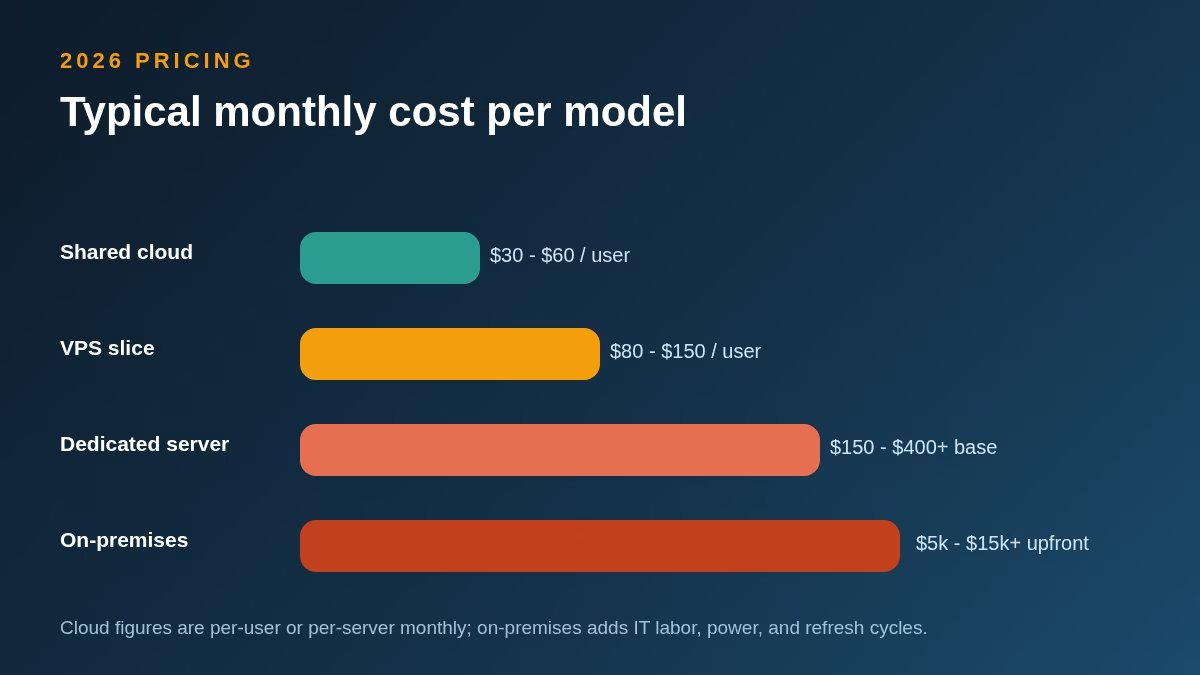
| Model | Typical price (2026) | What is usually extra |
|---|---|---|
| Shared cloud | $30 – $60 per user/month | Add-on hosting, extra storage, premium support tiers |
| VPS slice | $80 – $150 per user/month equivalent | Managed services, backup retention, Windows licensing |
| Dedicated server | $150 – $400+ per month base | Per-user access licences, management, off-site backups |
| On-premises | $5k – $15k+ upfront | IT labour, power, warranties, refresh every 4-5 years |
Run the five-year numbers, not the monthly ones. A six-person firm on shared hosting at $45 per seat spends about $16,200 over five years – predictable, no surprises. The same firm on a $250 dedicated server with $15 per-user access fees spends roughly $20,400, and buys silence from the noisy neighbours. For many firms the honest question is whether the premium equals one lost afternoon per month. Usually it does, once files pass the thresholds in the next section.
Budgeting side note: the same discipline applies across your software stack. Our best AI tools for small business and easy CRM platforms for small sales teams roundups apply the same total-cost lens to adjacent categories.
The middle path: VPS and “virtual dedicated” options
Between $50-per-seat shared plans and $300 dedicated boxes sits the fastest-growing option in 2026: the well-provisioned VPS. You get reserved CPU cores, guaranteed RAM and your own Windows instance, while the provider still handles the hardware layer.
A VPS is the right answer when three conditions line up: your file is in the 150 to 500 MB zone, your user count is between three and ten, and you want configuration freedom without dedicated pricing. It is the wrong answer when a provider sells you a “VPS” that is actually oversold shared hosting with a new label – ask for the guaranteed (not burstable) RAM and CPU figures in writing. The virtualisation background in our hypervisors and VPNs explainer will help you read those spec sheets with a sceptical eye.
Decision matrix: four questions that settle it
Most firms can pick a model by answering four questions honestly. Answer them for where you will be in eighteen months, not where you are today.
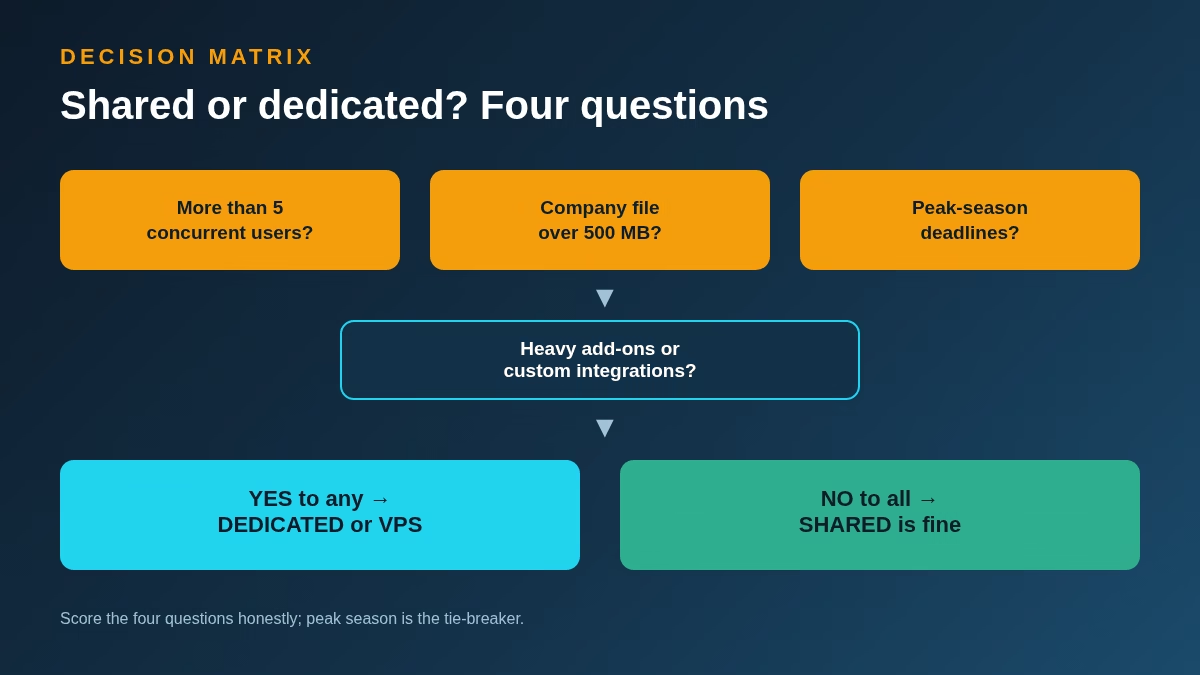
1. More than five concurrent users? Above five simultaneous sessions, shared contention becomes a daily tax. Lean VPS or dedicated.
2. Company file over 500 MB? Past this line, shared plans hit their RAM ceilings. Lean dedicated, with disciplined housekeeping either way.
3. Hard peak-season deadlines? If March slowness costs real money – tax practices, seasonal retail – pay for guaranteed resources. Shared is for firms whose busy season tolerates queues.
4. Heavy add-ons or custom integrations? Advanced inventory, manufacturing modules, EDI bridges and custom API middleware all want dedicated headroom. Firms running lean stacks – QuickBooks plus a few connectors like the ones in our free e-signature software or help desk software roundups – can stay shared longer.
One “yes” pushes you toward VPS or dedicated. Four “no” answers mean shared hosting is the financially rational choice, and you should bank the savings.
Which businesses benefit most from each model
Solo entrepreneurs and micro-businesses
One or two users, files under 150 MB, no heavy add-ons. Shared hosting – or honestly, QuickBooks Online – wins on price and simplicity. Pair it with lightweight tools like the picks in our employee scheduling software and customer messaging software guides and you have a full back office for the cost of a lunch.
Expanding small teams
Three to ten users, files approaching 300 to 500 MB, growing transaction volume. This is VPS country. You have outgrown shared’s ceilings but dedicated pricing still stings; a guaranteed-slice VPS buys three to four years of comfortable growth.
Accounting and bookkeeping practices
Here the math inverts. A practice hosting dozens of client files lives or dies on throughput and reliability. Dedicated servers – often several, segmented by client tier – are the professional standard. The per-client cost drops below shared pricing at scale, and nobody’s March deadline depends on a stranger’s condense job.
Enterprise-level operations
Files past 1 GB, 15 to 30+ users, inventory-heavy workflows, compliance obligations. Dedicated is the only serious answer, usually with redundancy: a secondary server or cloud replica, tested restores and documented failover. At this tier, hosting is infrastructure strategy, not IT plumbing.
Security: the baseline every model must meet
Your company file is the most sensitive document your business owns – payroll, banking, vendor terms, margins. Hosting model changes who guards it, not what guarding means. Any provider you consider in 2026 must clear this baseline before pricing enters the conversation.
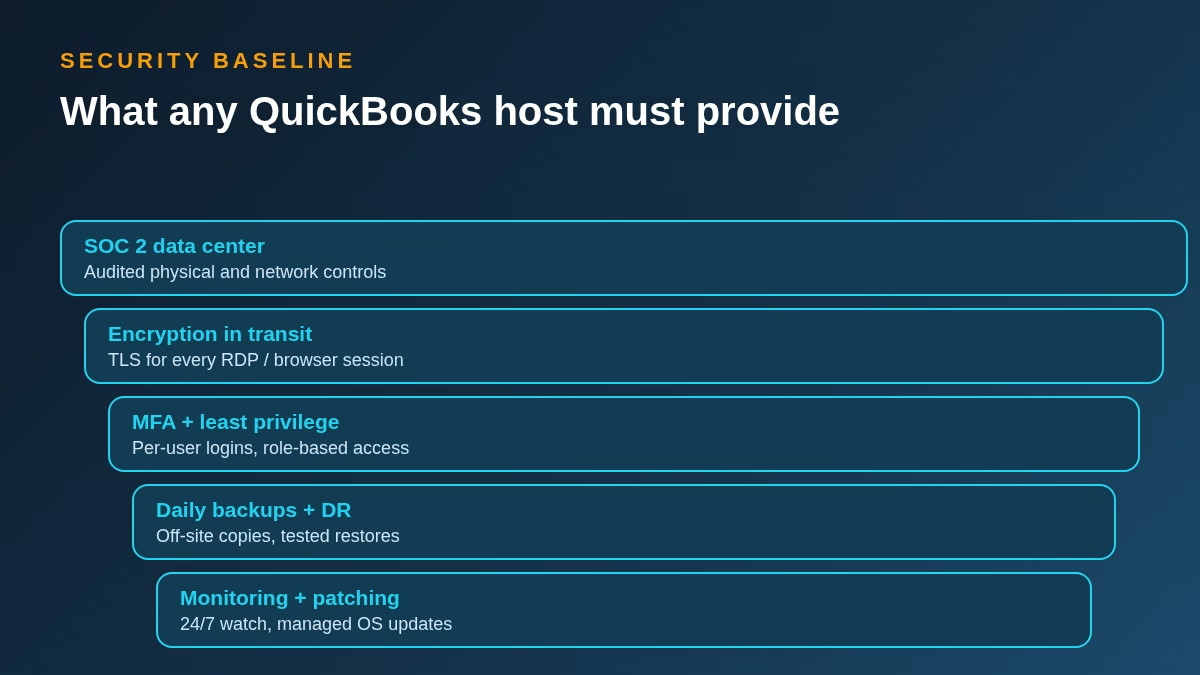
SOC 2 audited data centers. Physical and network controls audited by a third party, with reports available under NDA. The framework landscape is mapped in our cybersecurity compliance standards guide.
Encryption in transit. TLS on every RDP gateway and browser session, no exceptions. Your file contents should never cross the wire readable.
MFA and least-privilege access. Per-user logins with multi-factor authentication, role-based permissions and no shared credentials. The easiest win lives in your password policy; our best password manager apps roundup covers the tools.
Daily backups with tested restores. Off-site copies, at least 30 days of retention, and – the part everyone skips – a provider who will actually show you a restore test. Our incremental vs differential backup guide helps you interrogate their schedule.
Monitoring and managed patching. 24/7 intrusion monitoring and a patch cadence measured in days, not quarters. Threats evolve faster than annual maintenance; the shift toward autonomous defense in our autonomous cybersecurity explainer shows where the industry is heading, and the checklist in tips to protect your business from cyber threats covers what stays on your plate regardless of model.
Dedicated servers add one genuine security advantage – isolation – and one genuine responsibility: misconfiguration is yours. A hardened shared platform beats a neglected dedicated box every time.
A five-step migration roadmap
Switching hosting models is a weekend project when it is planned and a month of pain when it is improvised. This sequence has carried thousands of QuickBooks migrations; steal it.
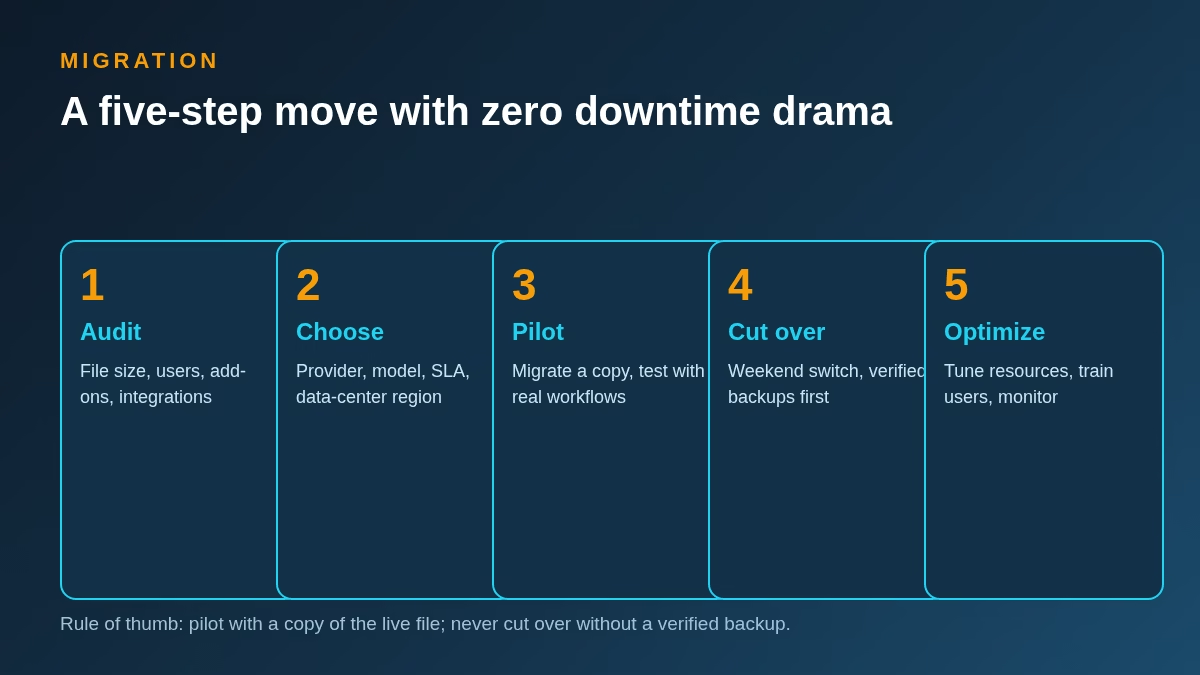
1. Audit. Record file size, user count, every add-on and integration, and the reports your team actually runs. This inventory is your acceptance test later.
2. Choose. Pick the model with the matrix above, then shortlist providers against the security baseline. Get the contention policy and guaranteed resources in writing.
3. Pilot. Migrate a copy of the live file. Have your two heaviest users run a real workday’s tasks and time everything against the audit.
4. Cut over. Schedule a weekend. Run a full backup, verify it restores, migrate, and freeze the old environment read-only for 30 days rather than deleting it.
5. Optimise. Tune session resources, train users on the new login flow, and watch performance for two full weeks – including one payroll run and one month-end close – before calling it done.
Evaluation checklist: ten questions for any provider
Print this for your next sales call. A provider who answers all ten crisply has earned your business; vagueness on any of them is your answer too.
| # | Question | What a good answer sounds like |
|---|---|---|
| 1 | How many tenants share a server? | A number, plus a per-tenant resource cap |
| 2 | Is my RAM guaranteed or burstable? | Guaranteed, in the contract |
| 3 | What storage type hosts my file? | NVMe, not spinning disk or network SATA |
| 4 | Show me a restore test | They schedule one during the trial |
| 5 | What is your uptime SLA and remedy? | 99.9%+ with service credits, not apologies |
| 6 | Which QuickBooks versions do you support? | Current plus three prior years, with upgrade help |
| 7 | Which add-ons are allowed? | A published list, plus a process for exceptions |
| 8 | Where is my data, legally? | Named data centers matching your compliance needs |
| 9 | How do I leave? | Full export of your file and data, no ransom fees |
| 10 | Who answers at 2 a.m. in tax season? | A human, with an escalation path |
Best practices to keep QuickBooks fast on any host
Whatever model you choose, these habits decide whether your investment pays off.
Condense and archive annually. Close the year, condense the file, and keep the archive on cold storage. Staying under the size thresholds beats upgrading around them.
Trim lists and memorised reports. Dead customers, obsolete items and a hundred saved report customisations all tax the file. Prune quarterly.
Schedule heavy jobs off-hours. Verify, rebuild, condense and big imports belong in the evening – on shared hosting this is courtesy, on dedicated it is still good hygiene.
Keep add-ons on a leash. Every integration polling your file adds load. Audit the list twice a year and kill what nobody uses.
Monitor, do not guess. Track open times and report durations monthly. A creeping slowdown is a capacity signal; catching it at 400 MB beats panicking at 900 MB.
Conclusion: match the model to the file you will have, not the file you have
Shared hosting is the right start for most small firms: cheap, maintained and genuinely good until contention and file size catch up. Dedicated hosting is the right destination for firms whose files, users or compliance needs have outgrown shared ceilings – and the VPS middle path covers the years in between. The mistake is not picking shared or dedicated; it is picking either one for the business you were two years ago.
Run the four-question matrix against where your file will be in eighteen months, hold providers to the security baseline, and pilot before you cut over. Do that, and QuickBooks stops being the app everyone complains about and goes back to being invisible – which is the highest compliment infrastructure can earn.
Frequently asked questions
Is shared or dedicated hosting better for QuickBooks?
Neither is universally better. Shared hosting wins on cost and zero maintenance for small files and lean teams. Dedicated hosting wins on predictable performance, headroom and control once your file passes roughly 500 MB or your concurrent users pass five. The four-question matrix above gives you the answer for your specific situation.
How much does QuickBooks hosting cost in 2026?
Typical 2026 ranges: shared cloud plans run $30 to $60 per user per month, VPS slices work out to $80 to $150 per user per month, and dedicated servers start around $150 to $400+ per month before per-user licensing and managed services. Always model five-year totals including add-ons and backup storage, not the landing-page sticker.
At what company-file size should I leave shared hosting?
Start evaluating alternatives around 300 MB and plan the move by 500 MB for multi-user teams. Pro and Premier files stay healthiest under 150 to 200 MB with annual condensing; Enterprise files can run well past a gigabyte on dedicated hardware with good housekeeping.
Can I migrate QuickBooks from shared to dedicated without downtime?
Yes, with a weekend cutover. Pilot with a copy of the live file first, verify a full backup restores cleanly, migrate over the weekend, and keep the old environment read-only for 30 days. The five-step roadmap above is the safe sequence.
Is a VPS the same as dedicated hosting?
Not quite. A VPS gives you guaranteed resources on shared hardware; dedicated gives you the entire machine. For most QuickBooks workloads between 150 and 500 MB with up to ten users, a properly provisioned VPS is indistinguishable from dedicated in daily use – and meaningfully cheaper.
What security features are non-negotiable in a QuickBooks host?
Five: a SOC 2 audited data center, TLS encryption on every session, per-user MFA with least-privilege access, daily off-site backups with demonstrated restores, and 24/7 monitoring with managed patching. Any provider who cannot confirm all five in writing should not get near your company file.
Will dedicated hosting make my large QuickBooks file fast again?
It removes contention and resource ceilings, which is most of the battle – but housekeeping is the other half. Condense annually, prune lists and saved reports, and keep add-ons lean. A neglected 1.5 GB file will eventually feel slow on any hardware.




Leave a Reply